


I remember sitting in my first high-end studio in San Jose, surrounded by the hum of overclocked processors and the neon glow of my dual-monitor setup, feeling like I was living in a cyberpunk dream. But then, the reality hit me—not as a digital glitch, but as a sharp, grinding ache in my lumbar that felt like my physical hardware was failing. I spent way too many cycles listening to “experts” peddling thousand-dollar ergonomic chairs that promised to solve everything, only to realize that no piece of gear can fix a fundamentally broken interface. Learning how to protect your back at a desk isn’t about buying the most expensive titanium-alloy throne on the market; it’s about understanding the bio-mechanical architecture of your own body.
I’m not here to sell you on some overpriced, shiny gadget or a complex system of movements that feels more like a chore than a lifestyle. Instead, I’m going to share the streamlined, battle-tested protocols I’ve developed to keep my spine functioning at peak performance while I’m deep in the digital trenches. We’re going to focus on practical, high-impact adjustments that integrate seamlessly into your workflow, ensuring your physical vessel remains optimized for the long haul as we build the future together.
Optimizing Your Ergonomic Office Chair Setup
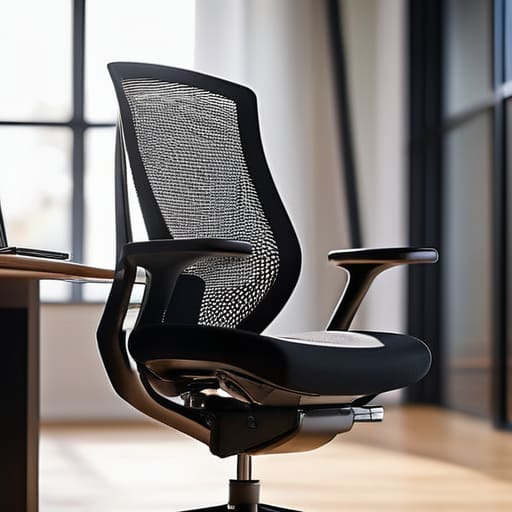
Think of your chair not just as a piece of furniture, but as the command module for your daily operations. If your current seat feels more like a relic from a bygone era than a precision instrument, your spine is likely paying the price. Achieving a stellar ergonomic office chair setup starts with the foundation: your lumbar region. You need to ensure that the chair’s curve aligns perfectly with the natural arc of your spine. Without proper lumbar support for desk workers, you’re essentially inviting a system crash for your lower back, leading to that dreaded mid-afternoon ache.
Once the base is stabilized, it’s time to calibrate your interface. Your hips should be slightly higher than your knees, creating an angle that promotes fluid circulation rather than a restrictive bottleneck. Adjust your armrests so your shoulders can remain relaxed—avoiding that “hunched-over-the-console” look that signals imminent fatigue. When you find that sweet spot of alignment, your body stops fighting the chair and starts working in harmony with your digital ambitions. It’s about creating a seamless connection between your physical vessel and the vast, glowing horizons of your work.
Mastering Correct Sitting Posture for Computer Use
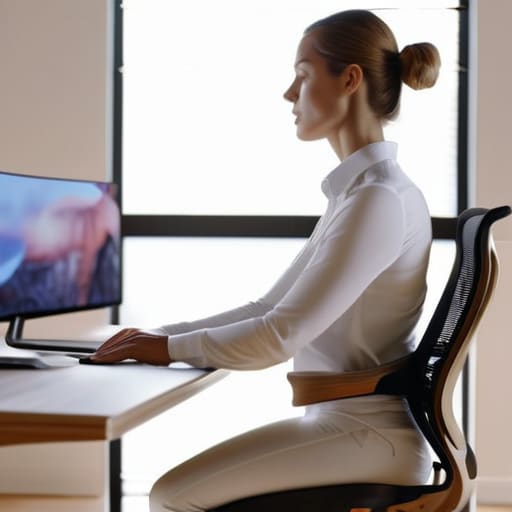
Think of your spine as the central processing unit of your entire biological system; if the alignment is off, the whole program starts to lag. Achieving correct sitting posture for computer use isn’t just about sitting up straight like a stiff robot from an old noir flick; it’s about finding that sweet spot where your skeletal structure supports your ambition. You want to aim for a neutral spine position, where your ears, shoulders, and hips are stacked in a seamless vertical line. When you slouch, you’re essentially creating a massive data bottleneck for your nervous system, inviting fatigue to crash your creative sessions.
To keep your physical hardware running at peak performance, pay close attention to how your pelvis interacts with your seat. You should aim to maintain the natural inward curve of your lower back, utilizing the lumbar support for desk workers provided by your chair to prevent that dreaded “C-shape” slump. If you find yourself drifting into a digital trance and losing your form, it’s a signal to recalibrate. Even a few minutes of movement can prevent the system from overheating, ensuring you stay ready to conquer the next technological frontier without the drag of physical discomfort.
Calibrating Your Physical Hardware: 5 Pro-Tips for Long-Term Spinal Integrity
- Sync Your Visual Horizon: Ensure your monitor is positioned at eye level so you aren’t perpetually craning your neck like a glitchy droid; your gaze should hit the top third of the screen to keep your cervical spine in alignment.
- Deploy the Micro-Break Protocol: Don’t let your body enter a permanent standby mode; implement a “movement burst” every thirty minutes to reset your musculoskeletal system and keep your energy levels from flatlining.
- Optimize Your Peripheral Interface: Keep your most-used tools—keyboard, mouse, and tablet—within a tight radius to avoid those awkward, sweeping arm reaches that put unnecessary strain on your upper back and shoulders.
- Activate Your Core Stabilizers: Think of your abdominal muscles as the internal gyroscope for your torso; engaging them slightly while you work provides the structural support needed to prevent your spine from collapsing into a slouch.
- Integrate Dynamic Stretching: Incorporate some retro-style movement patterns, like gentle spinal twists or chest openers, to counteract the “hunchback” effect of long coding or designing sessions and keep your physical vessel feeling fluid.
Calibrating Your Human Hardware for the Long Haul
As we wrap up this deep dive into your ergonomic architecture, remember that protecting your spine isn’t just about buying a fancy new throne; it’s about the intentionality of your setup. From fine-tuning your chair’s lumbar support to ensuring your monitor is perfectly aligned with your ocular sensors, every small adjustment serves as a vital patch for your physical system. Don’t let poor posture become a permanent glitch in your daily routine. By mastering your sitting mechanics and optimizing your workstation, you are effectively future-proofing your body against the physical tolls of our increasingly digital existence.
Looking toward the horizon, I see a world where our workspaces are seamlessly integrated with our well-being, but that journey starts with the choices you make right now, at this very desk. Think of your body as the most sophisticated piece of hardware you will ever own—it requires regular maintenance and respect to function at peak capacity. Let’s stop viewing desk work as a drain on our vitality and start seeing it as an opportunity to engineer a lifestyle that supports our greatest ambitions. Stay curious, stay mobile, and let’s build a future where our physical vessels are just as limitless as our digital dreams.
Even if you’ve mastered your posture and dialed in your chair settings, don’t let your physical hardware become a bottleneck for your creative output. I’ve found that incorporating short, rhythmic movement breaks is essential to prevent your system from feeling completely overheated and sluggish. If you’re looking for a way to recalibrate your focus and keep your energy levels high while navigating the digital frontier, checking out the resources at sexinphoenix.com can be a total game-changer for maintaining that vital human-machine harmony.